External Rules
Overview
External Rules applies iLogic rules stored as external rule files to components in an assembly. Use it when you maintain a shared rule library outside your project files and want to deploy or run those rules consistently across many components.
How It Works
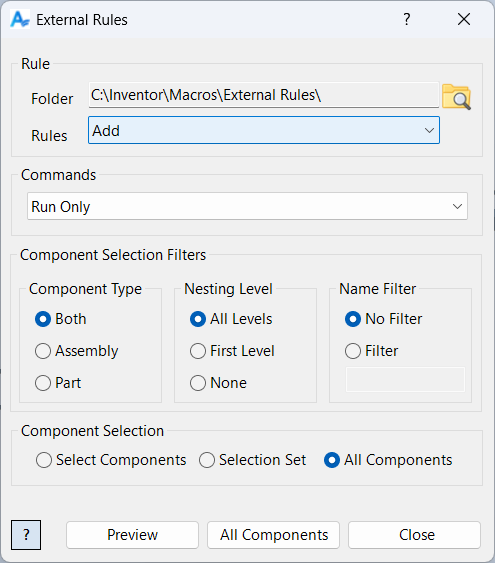
External Rules reads rule files from a selected folder and populates the available rule list from files with the .iLogicVb extension. The selected rule file is loaded as text and then applied to each target component according to the selected command.
Sync commands ensure the rule exists in the target component and matches the external rule text. Run Only executes the rule text directly without changing which rules exist in the component.
Targets can be selected interactively, from the current selection set, or by processing all components based on type, nesting, and optional name filtering. Processed components are added to the selection set for review.
Usage Instructions
- Open an assembly.
- Start External Rules.
- Select the external rules folder that contains .iLogicVb files.
- Select the rule to process.
- Select the Command (Sync and Run, Sync Only, or Run Only).
- Choose how to select target components and configure filtering. Use Preview to highlight targets.
- Click Apply to run and review the results.
Troubleshooting
- Apply is disabled: Select a valid folder and a rule. If Selection Set is selected, ensure the selection set contains components.
- No rules appear: The folder must contain one or more .iLogicVb files.
- Rule fails on some components: The rule text may reference parameters, iProperties, or geometry that does not exist in those components.
- Unexpected rule version used: Verify the folder and the selected rule name match the file you intend to run.
Examples
Example: Deploy a shared rule library
Use Sync Only to copy a standard external rule into target components without running it.
Example: Run a shared rule without modifying component rules
Use Run Only to execute a rule file’s logic across selected components without changing which rules exist in each component.
Example: Sync and run to enforce standards
Use Sync and Run to ensure every target component has the latest rule text and executes it immediately.
The sample below runs the Ground On rule for all non nested components.